
Notice
Recent Posts
Recent Comments
Tags
- cudnn
- model reliability
- regression model
- strayrobots
- LSTM
- 시계열 클러스터링
- stray scanner
- 실내측위
- GRU
- physics-based
- data augmentation
- Data-driven
- indoor positioning
- GitHub
- time series clustering
- keras
- LiDAR
- time series
- AR Kit
- confidence score
- odometry
- model calibration
- pytorch
- tslearn
- indoor navigation
- time series data
- multimodal learning
- Time Series Forecasting
- multi loss
- 시계열
- Today
- Total
EZI 기술 블로그 JU
stray scanner iOS 어플 체험 본문
docs
https://docs.strayrobots.io/apps/scanner/export.html
Exporting Data
There are two ways of exporting the data from the device. The first way is to connect your phone to a computer with a lightning cable. The other option is through the iOS Files app. To access data collected using Stray Scanner, connect your iPhone or iPad
docs.strayrobots.io
- 어플명: stray scanner
- 개발사: stray robots
- docs: 맨 위의 url 참조
- 준비물: iPhone 12 pro 이상 LiDAR 센서가 있는 모델
- 제공 데이터
- initial camera DCM, odometry, imu
- imu - frame 칼럼에 대응하는 png
- odometry 데이터 칼럼 ['timestamp', ' a_x', ' a_y', ' a_z', ' alpha_x', ' alpha_y', ' alpha_z']
- imu 데이터 칼럼 ['timestamp', ' frame', ' x', ' y', ' z', ' qx', ' qy', ' qz', ' qw']
- 주의! imu 데이터 칼럼이 ' x' ,' y' ,' z' 로 스페이스를 포함함2)
- export 하는 법 : 라이트닝 케이블 연결하여 itunes 에서 파일을 복사 붙여넣기
3차원 데이터 scatter plot 예시
fig = plt.figure(figsize=(7,7))
ax = fig.add_subplot(projection='3d')
ax.scatter(df_odo[' x'],df_odo[' y'],df_odo[' z'],s=1)
ax.scatter(df_odo[' x'].iloc[0],df_odo[' y'].iloc[0],df_odo[' z'].iloc[0],s=10)
ax.scatter(df_odo[' x'].iloc[-1],df_odo[' y'].iloc[-1],df_odo[' z'].iloc[-1],s=10)
plt.show()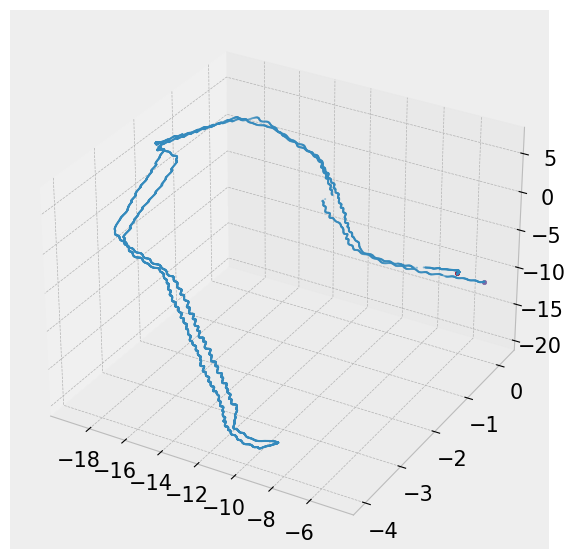
2차원 데이터 scatter plot 예시
plt.figure(figsize=(7,7))
plt.scatter(df_odo[' x'],df_odo[' y'],s=1)
plt.scatter(df_odo[' x'].iloc[0],df_odo[' y'].iloc[0],s=10)
plt.scatter(df_odo[' x'].iloc[-1],df_odo[' y'].iloc[-1],s=10)
* ground truth 값을 계산해서 제공하기는 하나 계단실의 회전을 잡아내지 못했음
* 시작 좌표가 (0,0,0)이 아니어서 산정 기준을 잘 모르겠음 <-
* 측정시 반드시 카메라를 켜야하므로 상시 측정이나 저전력 사용이 필요한 경우 제한적
반응형